Why the Screen Scrolls Before the Player Reaches the Edge
Why the screen scrolls before the player reaches the edge: see how camera timing shapes anticipation, reveals level space, and fits different game designs.
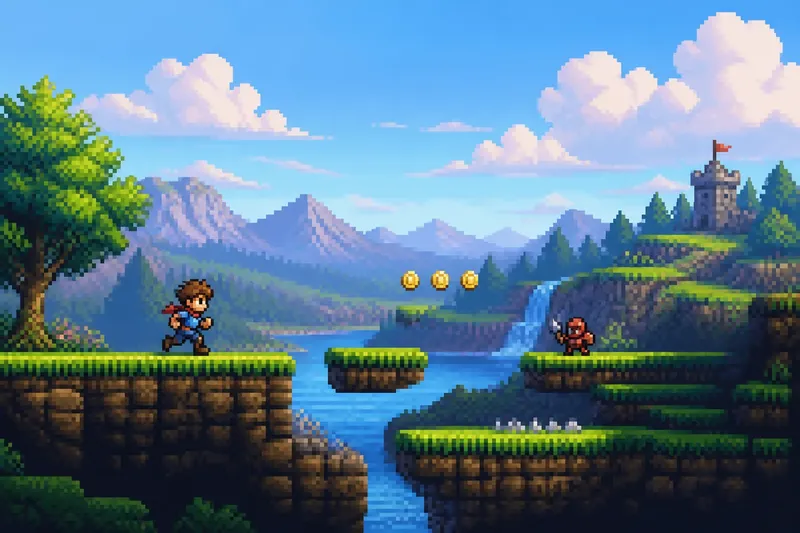
You run right across a quiet stretch of ground, and the scenery begins sliding left before your character reaches the television’s edge. That early camera movement is a deliberate choice: in a scrolling game, it can reveal space in stages and shape what you expect to meet next.
The screen is not merely following the player like a loose spotlight. Its boundaries can control when a corridor appears, how much room you have to react, and whether a new area feels like a discovery or an interruption. The right approach depends on what the level needs the player to notice and do.
What does early scrolling let the player see?
A fixed screen presents a complete little arena at once. A scrolling screen trades that full view for a moving window onto a larger place. The designer decides when the window shifts, and that timing determines how much of the route becomes visible before the player arrives.
If the camera starts moving well before the character reaches the edge, the next stretch enters view gradually. A platform may appear first, followed by the gap beneath it, then the enemy patrolling beyond. The player gets a chance to read the arrangement rather than meeting every hazard at once.
That gradual reveal can also preserve uncertainty. A wall, hill, or foreground object might conceal what lies beyond it. The camera can expose just enough to suggest a route without showing the whole room. In that sense, the screen edge works like a curtain: it controls the order in which the level’s details become available.
Which camera style fits your level?
Choose a camera rule to support the player’s immediate task, not simply because it is familiar. These common arrangements create different kinds of information and pressure.
- Early follow: The view begins tracking before the player nears the edge. This fits a long route with hazards that need advance warning, such as a series of ledges or an approaching enemy.
- Edge-triggered scroll: The character can move toward the border while the view stays still, then the scenery shifts once the character reaches a threshold. This suits compact rooms where the visible screen is meant to feel like a playable space of its own.
- Player-centered tracking: The character stays near the middle while the world moves around them. This can suit fast movement, though it may make nearby scenery harder to read if the camera responds too eagerly.
- Delayed follow: The player moves first and the camera catches up. This can make movement feel loose or dramatic, but it may be a poor fit for a narrow jump that requires precise visual information.
- Room-by-room framing: The camera waits until the player crosses a boundary, then shifts to the next area. This is useful when each room has a distinct layout or when a doorway should mark a clear change in play.
These rules can be combined. A game might keep the view still in a small interior, then use early follow on an exposed road. What matters is that each shift has a readable reason. If the camera changes behavior without a cue, the player may mistake camera movement for a change in their own speed or position.
When should the camera wait at the edge?
Let the player reach the edge before scrolling when the current screen is meant to be understood as a complete challenge. A contained room gives the player a stable view of its platforms, exits, and threats. It can also make a boundary feel physical: the player has reached the end of this space, not merely the point where the camera happens to move.
This works especially well when a screen transition separates one decision from another. The player may finish a jump, step through a doorway, or approach a new arena before the next layout appears. That pause gives the designer a clean moment to change the visual composition without asking the player to interpret two areas at once.
Waiting too long can become frustrating if the player needs information that is just beyond the border. A ledge can appear only as the character is already falling toward it, leaving little room to choose a response. If a screen edge hides an immediate threat, consider whether the player has a fair visual cue elsewhere, such as an approaching sound, a visible projectile, or a safer route.
When should the camera move early?
Move the camera early when the next part of the level needs to be read before the player commits. This often matters in fast sections, where braking or changing direction takes time, and in platforming sections where a jump depends on seeing both the takeoff point and the landing area.
Early movement is also helpful when the level’s shape matters more than a single room’s boundaries. A rising path, a long bridge, or a winding tunnel can feel connected if the camera carries the player through it without abrupt stops. The view then supplies a preview of the route, letting the player form a simple plan before acting.
But showing more space is not automatically kinder. A broad view can reveal a useful route and a dangerous obstacle together, yet a crowded image may be harder to parse than a controlled reveal. Use foreground scenery, contrast, and spacing to distinguish the path from decoration. If the next hazard is important, avoid letting it blend into the area where the player is already watching their feet.
What questions help you choose a scroll rule?
How much warning does the next obstacle need?
Ask how early the player must recognize the obstacle to make a meaningful choice. If they need time to stop, jump, or change lanes, reveal it before the character reaches the screen edge.
Should the current screen feel like a room?
If the player should assess a self-contained arena, hold the camera still until they cross a clear boundary. If the level should feel like one continuous route, a gradual follow can connect its spaces.
Does the level depend on surprise?
A fixed edge can hide a threat until the player approaches, creating a deliberate reveal. Use that surprise for a moment the player can respond to, not for an unavoidable hit that appears after the chance to react has passed.
Can the player tell why the view moved?
Keep camera behavior consistent within a stretch, or give a visible transition when it changes. A doorway, ridge, or change in room layout can signal that the screen is about to behave differently.
How can you judge the timing without guessing?
Imagine a short level with a character running toward a low gap, followed by a safe landing and a patrolling enemy. If the gap is meant to test quick recognition, begin the scroll early enough for the player to see its edge before reaching it; the expected result is that the player can choose to jump or slow down rather than discovering the gap mid-stride.
If instead the goal is to make the gap a surprise at the entrance to a new room, keep the first room framed until the character crosses its doorway. The expected result is a distinct reveal that still leaves space to respond, provided the gap is not positioned so close to the transition that the player arrives without room to act.
To evaluate either choice, watch the screen boundary as carefully as the character. Ask what enters view first, what stays hidden, and how much time separates recognition from action. A useful analogy is a flashlight beam: pointing it ahead can help you choose a path, while pointing it at your feet keeps attention on the next step. Neither view is always better; each serves a different kind of decision.
For a concrete design pass, mark the first moment each important feature becomes visible: a platform edge, a doorway, a moving enemy, or a safe landing. Then compare that moment with the action the player must take. If the information arrives after the decision, adjust the camera threshold or move the feature. If it arrives far earlier, decide whether the extra preview is useful or drains the moment of tension.
What should the screen boundary teach?
A screen edge can teach the player to expect a new room, warn that a route continues, or conceal a detail until they approach. Pick one main job for each boundary. When it does several jobs at once, make the visual cues clear enough that the player can tell whether they are crossing into a new challenge or simply seeing farther down the same path.
The reason a screen scrolls before the player reaches the edge is not to keep the character centered for its own sake. It is to deliver the next piece of information at the moment the level needs. When choosing a scroll rule, start with the player’s next decision; the camera should show enough of the space to make that decision feel intentional.