When Home Computers Became Game Machines in the 1970s and 1980s
When home computers became game machines in the 1970s and 1980s, cassette and disk games helped turn general-purpose systems into recognizable play platforms.
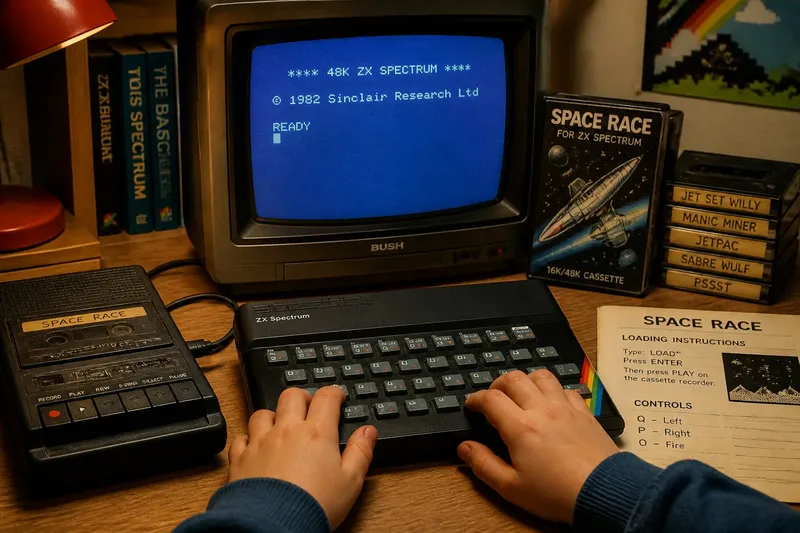
A cassette clicks into a tape deck, a command appears on a glowing screen, and a household computer begins loading a game. During the 1970s and 1980s, home computers such as the Apple II, Commodore 64, and ZX Spectrum made scenes like this familiar in their respective markets. The change was gradual: computers sold for more than play also became places to play.
When did home computers become game machines?
There was no single year when the home computer turned into a game machine. The shift took shape during the 1970s and gathered momentum in the 1980s, as systems designed for home use reached buyers with games among their available programs. The details varied by country and model.
In the United States, the Apple II, introduced in 1977, could run games alongside productivity and educational software. The Commodore 64, released in 1982, became a prominent home computer with a substantial game library. In Britain, the ZX Spectrum arrived in 1982, bringing a relatively accessible home-computing option that supported a lively game scene.
These examples mark a period, not a universal starting point. A computer might enter a home for learning or practical tasks, then acquire games through software bought separately or exchanged among users. Its identity shifted as people used it, rather than changing in one clean leap.
How did computers differ from game consoles?
A console was built and marketed chiefly for playing games. A home computer paired games with a keyboard and general-purpose software; depending on the system, it could also use removable media, peripherals, or a television as its display. That made the computer less like a dedicated game box and more like a desk that could take on different jobs.
The difference shaped the path into a game. A console player usually started with a cartridge or built-in game interface. A computer player might load a cassette or disk, select a program, and use the keyboard as part of play. These were broad tendencies, not rules for every machine or game.
What did the computer bring to gaming?
Games gave a visible, immediate purpose to a machine that could otherwise seem abstract. Pressing a key and seeing a character respond made the computer’s connection between input and screen easy to grasp. At the same time, games sat beside programming, schoolwork, and other software, so the machine offered more than a dedicated console.
Removable software helped widen that role. A cassette or floppy disk could carry a new game without replacing the computer. The media also made software tangible: it had a label, a case, and a place on a shelf. The computer was a little like a toolbox; the same base could support different activities when a person brought out the right program.
What should you know about early home-computer gaming?
Were home computers bought mainly for games?
Some households may have valued games most, while others wanted a computer for education, writing, or practical tasks. The intended use varied with the family, system, and local market.
Why did loading take longer than starting a console game?
On many systems, software had to load from cassette or disk before play began. The exact process depended on the computer and its storage equipment, so there was no single routine shared by every player.
Did every home computer use a television?
No. Some systems could connect to a television, while others were paired with a dedicated monitor. The display setup depended on the model and the household’s equipment.
Did computers replace game consoles?
No. Computers and consoles offered different combinations of software, controls, and uses, and many homes could have access to both. The rise of computer games expanded home gaming rather than ending console play.
How did software and setup shape the experience?
Starting a game could mean loading a tape, choosing a disk drive, or entering a command. These steps varied by machine, and they made the computer’s general-purpose character visible. The player encountered not only the game but also the process of getting software ready.
Imagine a family with a ZX Spectrum and a cassette game labeled “Space Race” in its case. A child inserts the tape, types the loading command printed in the game instructions, waits for the program to load, and sees the title screen appear. If the screen appears, the next choice is to start playing; if loading fails, the child can check the tape’s position and command before trying again. The game is the goal, but operating the computer is part of reaching it.
What details help identify an early computer game setup?
- Observe whether the computer has a keyboard; if it does, check whether the game uses it for controls, then follow the printed instructions or choose a compatible controller if the game supports one.
- Observe whether the software is on cassette; if it is, check the loading instructions, then enter the stated command or consult the system’s manual if no command is provided.
- Observe whether the software is on disk; if it is, check which drive the instructions name, then use that drive or look up the system’s disk procedure if the instructions are unclear.
- Observe whether the screen shows a loading prompt or error; if a prompt appears, follow it, but if an error appears, recheck the media and command before making another attempt.
- Observe whether the computer connects to a television or monitor; if the picture appears on the intended display, continue setup, but if it does not, check the cable and input selection before changing software settings.
- Observe whether the game includes a manual or instruction sheet; if it does, use its control and loading directions, but if it is missing, identify the computer model before relying on instructions for another system.
Why does the history still matter?
The home computer became a game machine through a combination of systems, software, and use over time. The Apple II, Commodore 64, and ZX Spectrum help anchor that history in specific machines and dates, while their varied roles show why no single household story explains the whole shift.
When home computers became game machines, they expanded the places where games could live: not only in a dedicated console, but also on a computer used for other purposes. That history is easier to picture when you notice the model name, the type of software, and the route from power-on to title screen. Those details tell you what kind of gaming experience a particular machine made possible.