D-Pad or Joystick: Two Different Feelings of Control
D-pad or joystick: understand how their shapes and movement affect classic-game control, so you can choose the input that suits the action.
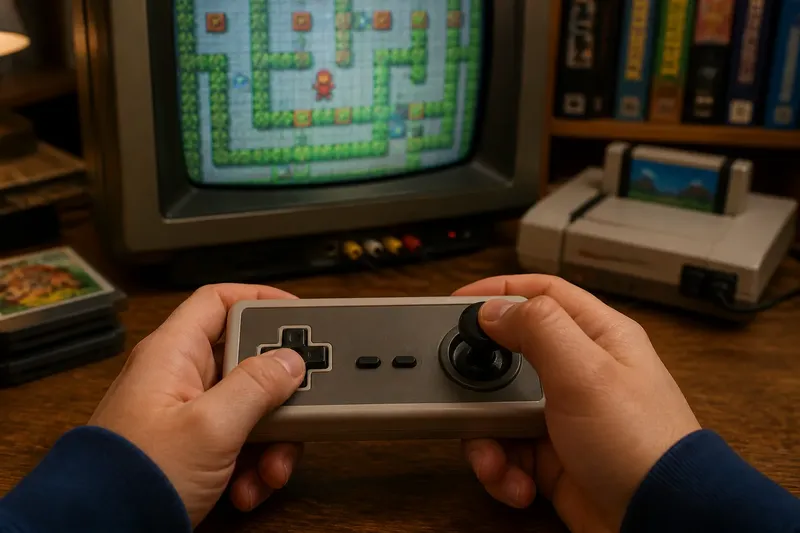
Your thumb settles on a cross-shaped pad, while your hand wraps around a stick. In a classic game, the difference between a d-pad or joystick can shape how you make each turn, correction, or sweep. Neither control is automatically better; each invites a different physical gesture.
Notice what your fingers can feel, how the game recognizes direction, and how movement changes on screen. A platformer, maze game, or flight simulator may feel more natural on one control because of the input it asks you to repeat.
How does a d-pad shape direction?
A d-pad gives your thumb a compact surface divided into directional arms. Pressing up, down, left, or right is a short, deliberate movement. The raised center and outer edges can help you find a direction without looking away from the screen.
The shape encourages distinct choices. The game may receive one direction or, if the controller and game support it, a combination such as up and right. That suits play built around clear lanes, grid cells, menus, and quick changes between fixed directions.
A thumb can rock from one arm to another, or press two arms together for diagonal input. The boundaries make those actions feel like separate decisions. It is like choosing a particular key on a keyboard rather than moving a knob through a continuous arc.
D-pads do not all feel the same. A stiff pad may need a firm press; a softer one may yield more readily. The cross’s size, center shape, and directional response all affect the feel. One player may prefer a pad for rapid tapping, while another may favor it for careful positioning.
What does a joystick add to movement?
A joystick moves through space instead of offering only separate buttons. Its angle communicates direction, and its travel can make the hand feel as if it is guiding a character or vehicle. Some games use only the direction of the stick; others respond to how far it tilts.
That continuous gesture can suit steering, aiming, or movement that curves. Rather than repeatedly pressing left and right to trace an arc, a player can hold the stick at an angle and adjust it as the action changes.
A joystick also asks for a different kind of contact. The hand may stabilize the controller while the fingers nudge the stick. That can feel expressive, but it may take more room and attention than moving a thumb on a small pad. A short stick and a taller stick can create different sensations even when they control the same game.
Not every joystick offers analog movement. Some register a direction only after the stick passes a threshold, behaving more like switches than a graduated control. The stick suggests a sweeping motion, but the game may interpret it as a simple directional command.
Which control makes quick corrections feel natural?
A rapid change exposes the difference between pressing a direction and steering toward one. With a d-pad, you can tap left, then right, using brief, distinct movements. That rhythm can feel crisp when a character snaps between lanes or needs small corrections in a tight space.
A joystick can make a correction feel more like an adjustment than a new command. You might ease it toward center, then tilt it the other way. That can suit movement with momentum or a vehicle that responds gradually. If the game expects an instant reversal, the stick may feel less direct to someone used to tapping a pad.
Hand position matters, too. A thumb can rest over a d-pad and move in small arcs. A joystick may call for a fingertip grip, a full-hand hold, or both. Players with different hand sizes, strength, or comfort may find one layout easier to use repeatedly without tension.
Say you are playing an invented maze game where a character moves one corridor at a time and stops at each junction. You try the d-pad, pressing left at a turn, and see the character take that clear corner. In the same invented game, imagine that the corridors instead allow smooth curves: you hold the joystick at an angle and see the character follow a gradual bend. The tradeoff is distinct, easy-to-time turns versus continuous steering; neither result proves one control is better in every game.
Why can the same game feel different on another controller?
A game’s rules meet a controller’s shape in your hands. A d-pad may encourage short pulses because it is built around discrete presses. A stick may invite sustained pressure because it can remain tilted. Those habits can change your timing even when both devices send the same basic directions.
Imagine an invented game where left and right move a character across a flat space. You tap the d-pad to make small moves, then hold it to keep running; the observable result is a sequence of distinct inputs followed by sustained movement. If you switch to a joystick, you hold it to one side and make a continuous gesture; the character still moves left or right, but your hand organizes the command differently.
Games can also interpret controls in ways that reinforce their shape. A menu may move one selection per d-pad press, while a held stick may move through several selections. A game may accept diagonal movement from a d-pad, while a stick offers an angle between directions. The game’s design decides what each input means.
That is why a controller should not be judged from its outline alone. Its dead zone, button response, return-to-center feel, and game-specific settings all shape the experience. Even a familiar genre can feel unusual if its control mapping asks for a different hand motion than you expect.
What should you check before choosing?
Rather than asking which control is best, notice what the game asks your hands to repeat. Use a safe area or title screen when possible, and look for observable responses before moving into a demanding section.
- Check the movement pattern. If the game uses grid-like turns or lane changes, then try distinct d-pad presses; if it uses curved travel, then try a joystick sweep instead.
- Check how movement starts and stops. If the character begins and stops immediately, then try the d-pad for crisp commands; if movement builds or eases, then try holding and adjusting the joystick.
- Check diagonal input. If the game responds to two directions at once, then use whichever control makes that combination clear; if it favors horizontal or vertical movement, then use separate presses or stick angles as the game permits.
- Check your hand posture. If your thumb can reach the pad without strain, then continue with it; if gripping and nudging the stick feels more comfortable, then use the stick, and stop if either position causes discomfort.
- Check a low-pressure area. If a title screen, safe room, or early movement area lets you try both controls, then compare a turn and a held direction there; if it does not, then use the game’s control display or manual to identify its intended inputs.
- Check the controller’s condition and layout. If a direction feels inconsistent, a part sticks, or a button sits awkwardly, then try another controller or inspect the control mapping; if the controller behaves consistently and feels comfortable, then judge the control type rather than a fault in that device.
These checks are observations, not rules. You may enjoy steering with a d-pad or prefer a joystick for precise directional taps. Familiarity matters: a control that first feels unpredictable can become easier to read as its physical cues become familiar.
What do players ask about d-pads and joysticks?
Is a joystick always analog?
No. A stick may report only whether it has crossed a directional threshold, or it may communicate a range of tilt. The controller and game determine how much information the movement carries.
Can a d-pad register diagonal movement?
Many d-pads can accept two directions together, but the feel and interpretation vary. The controller may register a diagonal, while the game chooses to use it or prioritize one direction.
Why does a joystick sometimes feel loose or stiff?
Construction, wear, and return-to-center resistance can change the sensation. If a control feels damaged or behaves inconsistently, avoid forcing it and follow the manufacturer’s guidance.
Which control is easier for a beginner?
It depends on the game and the player’s hands. A d-pad can make fixed directions easy to identify, while a stick can make steering intuitive; choose the one whose movement matches the game’s response and feels comfortable.
How can you read a game’s control language?
When you pick up a classic controller, notice its physical cues before deciding what it ought to do. A cross-shaped pad marks directions as separate choices. A stick offers a movable point of contact and suggests that movement may vary with angle or pressure. Those cues are invitations, not promises.
Then watch the screen as you press or tilt. Does the character stop at a boundary? Does a held direction keep it moving? Does a diagonal change its path? The answers show how the game translates hand movement into action. The same controller can feel different across two games because each one speaks a different control language.
For a player revisiting an old console, this distinction can make the first few minutes more satisfying. Instead of blaming your timing when movement feels odd, notice whether the game wants a tap, a hold, or a gradual adjustment. The phrase d-pad or joystick points to a choice between physical gestures, not a ranking of skill or quality. If a control feels unfamiliar, check the game’s response before changing your technique.